Azure Functions and Cosmos DB: Bindings vs SDK (And What They Cost in RU/s)
Muhammad Kamran
Most Azure Functions tutorials show you bindings first. Three lines of config, no client code, and your document lands in Cosmos DB. It looks like you get all of that for free.
You don't, but not in the way people usually assume.
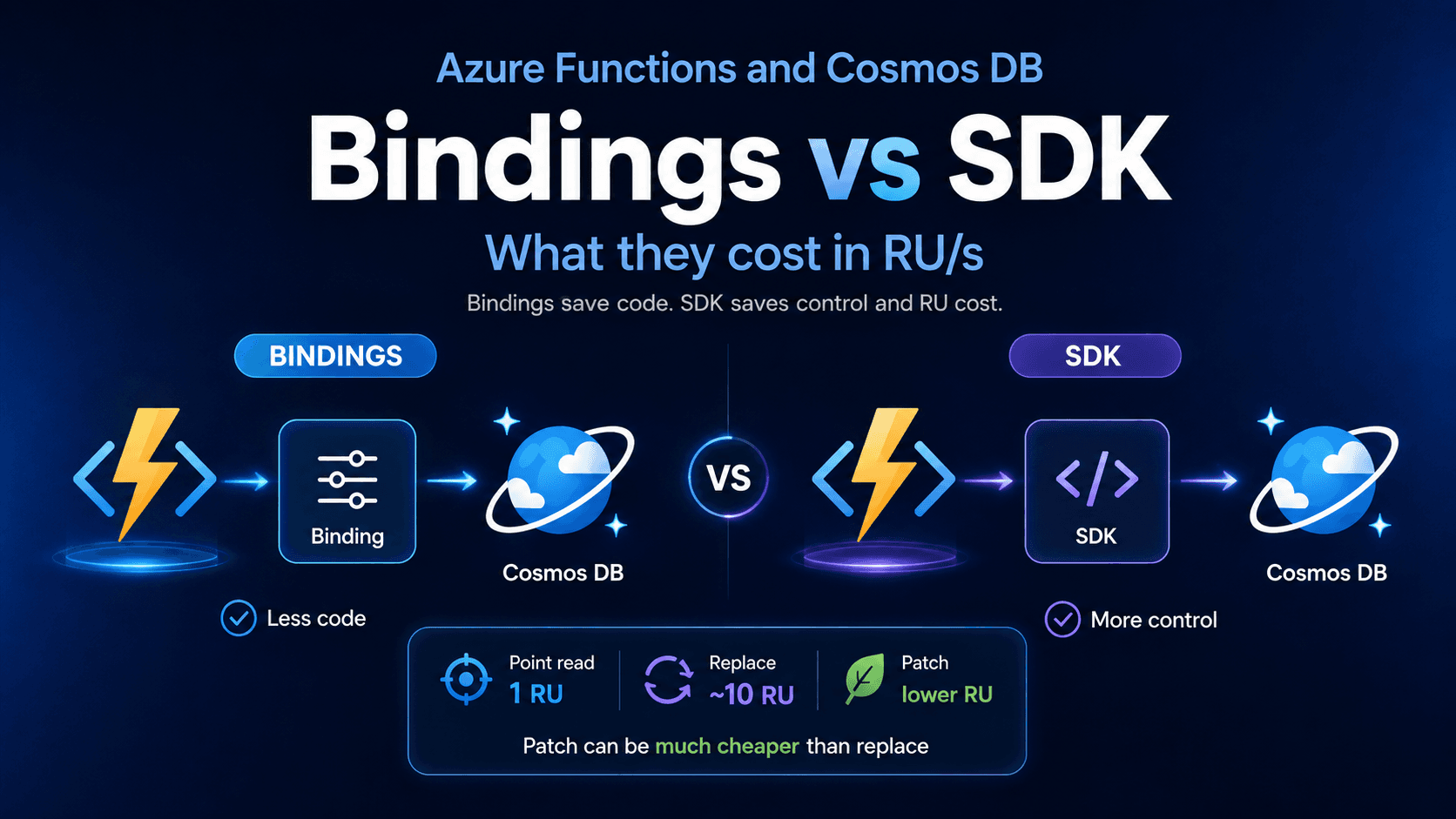
A binding and the SDK run the same database operation. A point read costs 1 RU either way. Bindings are not secretly more expensive per call.
The real problem is this: bindings hide the RU cost from your code, and they limit which operations you can choose. You can't measure what you're spending, and you can't pick the cheaper access pattern even when one exists.
This post covers where that actually bites you, and when the extra SDK code is worth writing.
What is an RU and what does it cost?
A Request Unit measures how much work one database operation takes. It bundles CPU, memory and disk into a single number. Every read and write spends RUs. Go over your limit and Cosmos DB returns HTTP 429.
Microsoft publishes the actual formula in Understanding Request Units consumption. These are their illustrative numbers for a 1 KB document with ten indexed properties in one region:
Point read: 1 RU. You already know the id and the partition key. This is the cheapest thing Cosmos DB does.
Create: about 7 RU. The math is 5.0 for the document size, plus 0.2 for each of the ten indexed terms.
Update: about 10.8 RU. An update is a delete plus an insert internally. So it is 5.0 + 5.0, plus index removal and index insertion for each changed property. Microsoft's own summary is that updates cost roughly twice what creates cost when only a few index terms change.
Those numbers move with your document size, your indexing policy and your region setup. Treat them as the shape of the problem, not as your bill.
Queries are harder to predict. A query on one partition might cost a few RU. A query without a partition key has to check the index on every physical partition, even the ones holding no matching documents. Add partitions and that cost grows.
Notice what the formula tells you: indexed properties drive write cost. That is the lever most people never touch.
What this costs in money
Approximate US single-region list prices as of August 2026. They exclude storage, networking and your Azure Functions bill, and they change by region.
Standard provisioned: about $0.008 per 100 RU/s per hour. The minimum is 400 RU/s, so roughly $23 per month even at zero traffic.
Autoscale: about $0.012 per 100 RU/s per hour, so 1.5x standard. It scales between 10% and 100% of your ceiling.
Serverless: about $0.25 per million RUs consumed.
One correction to how this usually gets explained. With provisioned throughput you pay for the RU/s you reserve, used or not. With serverless you pay for the RUs you consume. Storage is billed separately in both cases.
Serverless is worth checking for Functions apps because the traffic is usually spiky. Against the 400 RU/s minimum at these prices, serverless stays cheaper until roughly 93 million RUs a month.
But read the comparison page before you commit. Serverless accounts are single-region. They give you no throughput guarantee. And you cannot convert an existing account between serverless and provisioned. You pick once.
What bindings do well
There are three Cosmos DB binding types, and all of them save real code.
The input binding fetches a document before your function runs:
import { app, input, HttpRequest, InvocationContext } from '@azure/functions';

const orderInput = input.cosmosDB({
  databaseName: 'shop',
  containerName: 'orders',
  connection: 'COSMOS_CONNECTION',
  id: '{id}',
  partitionKey: '{tenantId}',
});

app.http('getOrder', {
  route: 'tenants/{tenantId}/orders/{id}',
  methods: ['GET'],
  extraInputs: [orderInput],
  handler: async (req: HttpRequest, ctx: InvocationContext) => {
    const order = ctx.extraInputs.get(orderInput);
    return order ? { jsonBody: order } : { status: 404 };
  },
});
The output binding writes what you give it:
ctx.extraOutputs.set(orderOutput, { id, tenantId, status: 'created', items });
The trigger runs your function when documents change:
app.cosmosDB('onOrderChanged', {
  databaseName: 'shop',
  containerName: 'orders',
  connection: 'COSMOS_CONNECTION',
  leaseContainerName: 'leases',
  handler: async (documents: unknown[], ctx) => { /* ... */ },
});
The trigger is the best one by a distance. It handles checkpoints, leases and partition balancing. Writing that yourself is painful, easy to get wrong, and it is not your business logic. Use it.
The input binding is also fine when you read by id and partitionKey. That is a point read at 1 RU. There is nothing to optimise.
The problems start everywhere else.
Problem 1: Bindings hide request charge from your code
Every Cosmos DB SDK response includes a requestCharge telling you exactly what that operation cost. Bindings hand you the document instead. That number never reaches your handler.
You are not completely blind. Azure Monitor diagnostic logs capture data-plane requests with a RequestCharge field, so you can build dashboards and alerts from the platform side.
What you lose is the ability to attach cost to your own context. With the SDK you can log the RU spend next to a tenant ID, a request ID, or a specific code path:
const { resource, requestCharge } = await container.item(id, tenantId).read();
ctx.log(`read order ${id} for ${tenantId}: ${requestCharge} RU`);
That correlation is the difference between "our RU usage went up this week" and "the reporting endpoint for tenant X is doing a cross-partition scan." One is a dashboard. The other is a fix.
Problem 2: Bindings read data before your code runs
Input bindings fetch data before your handler starts.
So if your function checks a token and rejects the request, you already paid for that read:
handler: async (req, ctx) => {
  if (!isAuthorized(req)) return { status: 403 };  // you already paid
  const order = ctx.extraInputs.get(orderInput);
}
On a 1 RU point read this doesn't matter. Ignore it.
It matters when your input binding runs a sqlQuery returning hundreds of documents behind an endpoint that rejects a lot of traffic.
Worth noting: if you use built-in App Service authentication or an API gateway, unauthorised requests get blocked before your function is invoked at all. This only applies to authorisation logic living inside your handler.
Problem 3: The output binding can't patch
Output bindings create or overwrite whole documents. There is no patch operation.
Now, the part most blog posts get wrong: patch is not dramatically cheaper than replace. Microsoft's partial document update FAQ says patch is billed the same way as any other operation and you should not expect a significant RU reduction. There are Microsoft Q&A threads showing patch costing slightly more than replace on small documents.
So why bother?
Because patch removes a step. Without it, updating one field on an existing document means read, modify in memory, replace. That read is a separate operation with its own RU charge, plus a network round trip, plus an ETag check if you care about concurrency.
// read + replace: two operations
const { resource } = await container.item(id, tenantId).read();
resource.status = 'shipped';
await container.item(id, tenantId).replace(resource);

// patch: one operation
await container.item(id, tenantId).patch([
  { op: 'replace', path: '/status', value: 'shipped' },
  { op: 'set', path: '/shippedAt', value: new Date().toISOString() },
]);
You save the read RU, one round trip, and the bandwidth of shipping a large document over the wire twice. On a hot update path that adds up. Patch also handles multi-region write conflicts better, because updates to different paths in the same document can merge.
The binding gives you none of this.
Problem 4: Queries without a partition key get worse over time
This input binding looks safe:
input.cosmosDB({
  sqlQuery: 'SELECT * FROM c WHERE c.status = "pending"',
})
No partition key, so it runs against every physical partition.
Here is the part people miss. Each physical partition holds up to 50 GB. As your data grows, Cosmos DB splits it into more partitions. Your query then touches more partitions. Your code did not change, but your RU cost went up.
The SDK lets you scope the query and see what it cost:
const { resources, requestCharge } = await container.items
  .query(
    { query: 'SELECT * FROM c WHERE c.status = @s', parameters: [{ name: '@s', value: 'pending' }] },
    { partitionKey: tenantId, maxItemCount: 100 }
  )
  .fetchNext();
Prefer fetchNext() over fetchAll(). fetchAll() pulls every page before returning. On a large or unbounded result set that means more RUs, more memory, and a longer execution time. fetchNext() gives you bounded pages and lets you stop early.
Problem 5: A retried function repeats everything
The Cosmos DB SDK sitting under the binding does retry throttled requests on its own. So a single 429 usually doesn't fail anything.
The problem is what happens after those retries run out. The invocation fails, and your trigger or caller retries the whole function. Every input binding read runs again. Every calculation runs again.
So a 10 RU write that ultimately fails three times does not cost 30 RU. It costs three full runs of your function.
This is nastier under sustained load, because throttling causes retries and retries cause more throttling. Your function metrics only show failures, so nobody thinks to check RU consumption.
With the SDK you control the retry policy yourself, and a failure stays scoped to the operation that failed:
const client = new CosmosClient({
  endpoint,
  key,
  connectionPolicy: {
    retryOptions: { maxRetryAttemptCount: 9, maxWaitTimeInSeconds: 30 },
  },
});
Problem 6: Limited bulk control
Output bindings can write multiple documents. You can hand them an array. So this is not a capability gap.
What you don't get is control. No per-operation results, no request charge per document, no patch operations in the batch, no concurrency tuning.
The JavaScript SDK has executeBulkOperations, available in @azure/cosmos 4.3 and later. It replaces the older items.bulk() method, removes the 100-operation limit, retries individual operations, and adjusts concurrency based on throttling:
const { BulkOperationType, PatchOperationType } = require('@azure/cosmos');

const operations = docs.map(d => ({
  operationType: BulkOperationType.Patch,
  id: d.id,
  partitionKey: d.tenantId,
  resourceBody: {
    operations: [{ op: PatchOperationType.Set, path: '/fulfilmentQueued', value: true }],
  },
}));

const results = await container.items.executeBulkOperations(operations);
If you are on the .NET SDK, the equivalent is AllowBulkExecution = true in CosmosClientOptions. That flag does not exist in the JavaScript SDK, and plenty of blog posts get this wrong.
Problem 7: The lease container costs money
The change feed trigger needs a lease container to save its progress. If it gets its own provisioned throughput at the 400 RU/s minimum, that is about $23 per month before you process anything.
Three triggers with three lease containers is about $70 per month at US list prices, just for bookkeeping.
Share one lease container across functions using leaseContainerPrefix, or put your leases in a shared-throughput database. It takes two minutes.
Also turn off createLeaseContainerIfNotExists in production. Create the container yourself so you control its throughput.
The SDK's own trap: reuse a single CosmosClient
CosmosClient is expensive to build. It does endpoint discovery and opens a pool of TCP connections.
Create one inside your handler and you pay that cost on every invocation. Under load it adds latency and puts real pressure on your outbound socket limits.
Create it once, at module level:
// cosmos.ts
import { CosmosClient } from '@azure/cosmos';

const client = new CosmosClient(process.env.COSMOS_CONNECTION!);
export const orders = client.database('shop').container('orders');
In C# isolated worker, register it as a singleton in Program.cs.
This is the most common Cosmos DB mistake in serverless code. It is also the strongest argument for bindings, because the runtime handles client lifetime for you and you cannot get it wrong.
A good middle ground
You don't have to pick a side. Use the trigger binding, then do the work with the SDK.
import { orders } from '../cosmos';

app.cosmosDB('onOrderChanged', {
  databaseName: 'shop',
  containerName: 'orders',
  connection: 'COSMOS_CONNECTION',
  leaseContainerName: 'leases',
  leaseContainerPrefix: 'orders-',
  handler: async (docs: any[], ctx) => {
    const paid = docs.filter(d => d.status === 'paid');
    if (!paid.length) return;

    const results = await orders.items.executeBulkOperations(
      paid.map(d => ({
        operationType: BulkOperationType.Patch,
        id: d.id,
        partitionKey: d.tenantId,
        resourceBody: {
          operations: [{ op: PatchOperationType.Set, path: '/fulfilmentQueued', value: true }],
        },
      }))
    );

    const totalRu = results.reduce((sum, r) => sum + (r.requestCharge ?? 0), 0);
    ctx.log(`patched ${paid.length} orders, ${totalRu.toFixed(2)} RU`);
  },
});
Neither approach is automatically cheaper. Bindings optimise for how fast you write the function. The SDK optimises for control and visibility. What actually drives your bill is the operation you choose and how your data is indexed, and a binding will never show you either one.
Enjoyed this article?
Check out more of my content or get in touch if you'd like to work together on your next project.