React Native SQLite on the New Architecture: What Changed and How to Set It Up
Muhammad Kamran
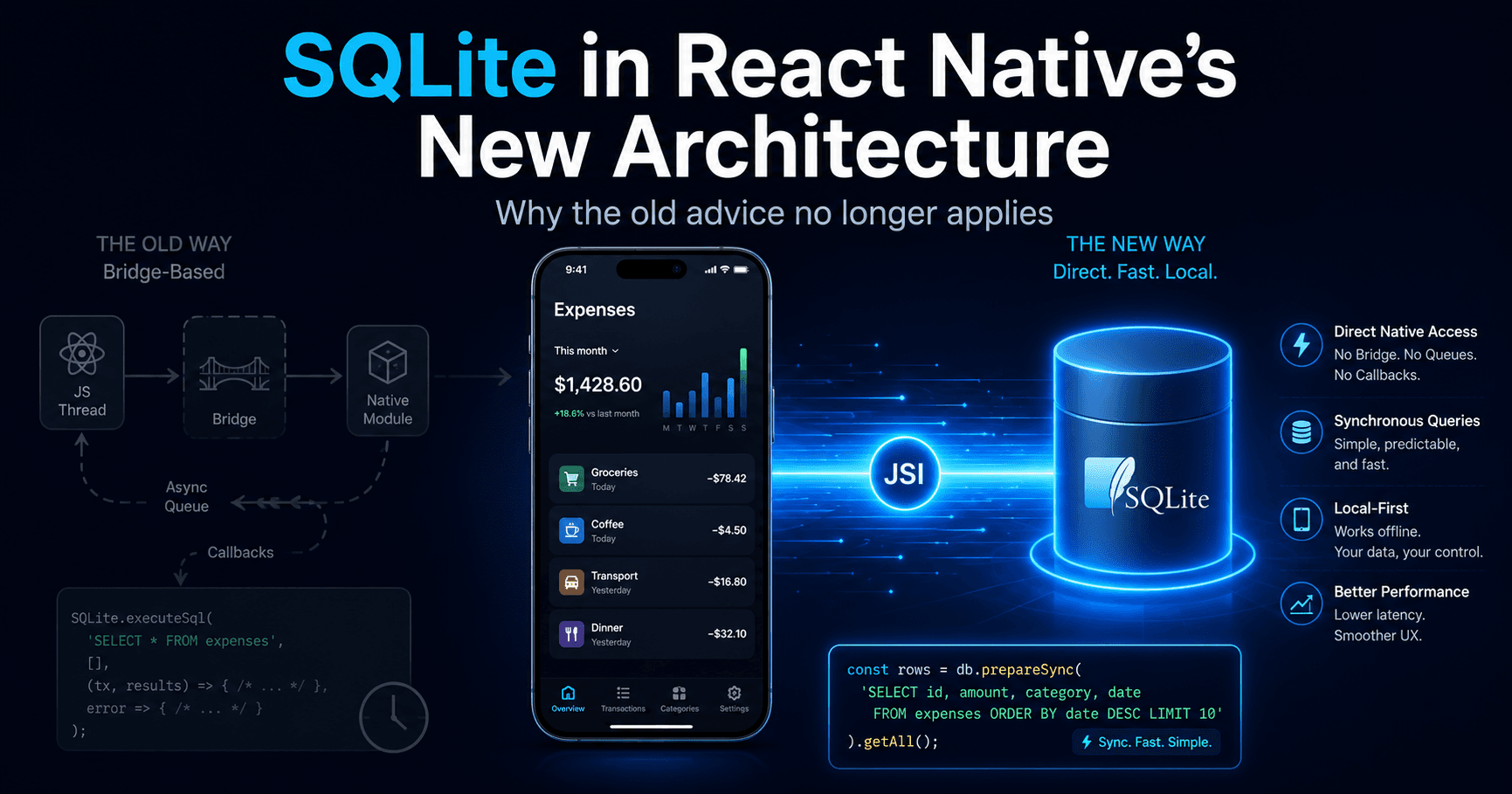
Most SQLite guides for React Native were written for an architecture that no longer exists. They open a database with react-native-sqlite-storage, wrap every call in a callback, and warn you not to query too much data at once because the bridge will choke. None of that advice applies to a project scaffolded today.
I've spent the last few months building a local-first expense tracker in React Native CLI — every transaction, account, and chat message lives in SQLite on the device, with no backend at all. That constraint forced me to actually understand what the New Architecture changed at the storage layer, instead of copying a setup from a 2022 blog post. This is what I wish someone had written before I started.
What the New Architecture actually changed for databases
The short version: the asynchronous bridge is gone, and with it the reason most SQLite libraries were designed the way they were.
Under the old architecture, calling a native module meant serializing your arguments to JSON, pushing them onto a queue, waiting for the native side to pick them up, running the query, serializing the result set back to JSON, and deserializing it in JavaScript. For a query returning 5,000 rows, the SQLite execution itself was often the cheapest part of the operation. Everything expensive happened at the boundary.
The New Architecture — enabled by default since React Native 0.76, with the legacy architecture frozen from 0.80 onward — replaces that with JSI. Native code can now expose C++ objects directly to the JavaScript runtime. No serialization, no queue, no thread hop unless you explicitly ask for one. A SQLite library built on JSI can hand you a result set as a JavaScript object that was constructed directly in memory.
Two practical consequences follow:
Synchronous queries are viable again. A JSI-backed db.execute('SELECT * FROM transactions WHERE account_id = ?', [id]) returns immediately, on the JS thread, with no promise. For the small, indexed queries that make up 90% of a typical app, this is genuinely faster than awaiting a promise and cleaner to write. You can call it inside a Zustand selector or a render function without restructuring your component.
The old performance folklore is obsolete. "Don't select too many rows" and "batch your writes to avoid bridge congestion" were bridge problems, not SQLite problems. SQLite has always been fast. What was slow was getting the data out of it. Now that the boundary is cheap, your bottleneck moves back where it belongs: missing indexes, N+1 query patterns, and doing work in a loop that a single SQL statement could do.
None of this means you should run every query synchronously. More on that below — sync access is a sharp tool, and blocking the JS thread on a 200ms migration is still a frozen UI.
Picking a library in 2026
The landscape has consolidated. Here's how I'd read it:
@op-engineering/op-sqlite is the performance leader and the most feature-complete. It ships SQLCipher for encryption, libSQL and Turso support for sync, reactive queries, and now even Node.js support. If you're building something data-intensive or you know you'll need managed sync, this is the safe pick. It's also the one with the largest community and the most StackOverflow answers.
react-native-nitro-sqlite is the successor to react-native-quick-sqlite, rebuilt on Margelo's Nitro Modules. The renaming happened at version 9.0.0; if you find a tutorial referencing react-native-quick-sqlite, it's describing this library's older self. Nitro generates statically typed C++/Swift/Kotlin bindings from TypeScript interfaces, which in practice means the type safety is real rather than hand-maintained. It requires React Native 0.75 or later and a peer install of react-native-nitro-modules. Every operation is available in both sync and async form.
expo-sqlite has quietly become excellent, and if you're in an Expo-managed project there's very little reason to look elsewhere. Drizzle ORM has first-class support for it, so you get migrations and type-safe queries close to free. It also runs on web, which none of the JSI-native options do.
react-native-sqlite-storage still works, and if you have a legacy codebase depending on its pre-populated-database features, migrating away is not urgent. For anything new, don't.
I went with NitroSQLite. The honest reason is that the API is small enough to hold in my head and I wanted to write raw SQL rather than adopt an ORM. The Nitro type generation and the clean sync/async split sealed it. op-sqlite would also have been a fine choice, and I'd probably reach for it on a project with real encryption or sync requirements.
Setting it up in a bare React Native CLI project
npm install react-native-nitro-sqlite react-native-nitro-modules
npx pod-install
That's the whole installation on the New Architecture. No MainApplication.kt edits, no AppDelegate registration, no linking step. Autolinking handles both packages, and because Nitro modules register themselves through the TurboModule system, there's nothing to add to your package list.
Opening a connection:
import { open, type NitroSQLiteConnection } from 'react-native-nitro-sqlite'

export const db: NitroSQLiteConnection = open({ name: 'dbname.sqlite' })

db.execute('PRAGMA journal_mode = WAL')
db.execute('PRAGMA foreign_keys = ON')
Those two pragmas are not optional in my opinion, and neither is on by default.
WAL mode lets readers and writers work concurrently instead of blocking each other, which matters the moment you have a background task writing while the UI reads. foreign_keys = ON is the one that catches people out — SQLite ships with foreign key enforcement disabled for backwards compatibility. Your REFERENCES clauses are decorative until you turn it on. Turn it on. Finding out in production that six months of orphaned rows accumulated silently is a worse day than fixing constraint errors during development.
Note that foreign_keys is a per-connection setting, not a per-database one. If you open a second connection anywhere, it needs the pragma too.
Schema decisions worth making up front
Three choices I made early that I'd repeat, and one I'd change.
Use text UUIDs as primary keys, not INTEGER PRIMARY KEY AUTOINCREMENT. Autoincrement IDs are faster and smaller, and they're a trap the moment you want cloud sync. Two devices offline both create record #47, and now you have a merge conflict that no amount of clever server code can resolve cleanly. UUIDs generated on-device are globally unique from birth. The storage cost is real but irrelevant at the scale a mobile app operates at. If you have any suspicion you'll add sync later, pay this cost now — retrofitting it means rewriting every foreign key in the schema.
Store money as integers, in the smallest currency unit. Not REAL. Not TEXT. A column of amount_minor INTEGER NOT NULL holding paisa, cents, or fils. Floating-point arithmetic on currency produces the classic 0.1 + 0.2 = 0.30000000000000004 class of bug, and in a finance app those errors accumulate across thousands of rows until your reported balance is visibly wrong. Do the division to a display string exactly once, at the render layer, and never let a float back into the database.
Soft-delete everything with a nullable deleted_at. Users delete things by accident. Sync protocols need tombstones to propagate deletions. Both problems disappear if rows are never actually removed. The cost is that every query needs WHERE deleted_at IS NULL, which is easy to forget — so I put the filter inside the repository functions and never write raw SELECTs at the call site.
The thing I'd change: I initially wrote timestamps as ISO 8601 strings because they're readable when I'm poking at the database. They sort correctly lexicographically, so it mostly works, but date arithmetic in SQL becomes clumsy and timezone handling gets ambiguous. Unix epoch integers would have been the better call.
Migrations without an ORM
If you skip an ORM, you own migrations. This is less work than it sounds — a version table and an ordered array is enough:
const migrations: Array<(db: NitroSQLiteConnection) => void> = [
  (db) => {
    db.execute(`
      CREATE TABLE accounts (
        id TEXT PRIMARY KEY NOT NULL,
        name TEXT NOT NULL,
        balance_minor INTEGER NOT NULL DEFAULT 0,
        created_at TEXT NOT NULL,
        deleted_at TEXT
      )
    `)
  },
  (db) => {
    db.execute('CREATE INDEX idx_tx_account ON transactions(account_id)')
  },
]

export function migrate(db: NitroSQLiteConnection) {
  const { rows } = db.execute('PRAGMA user_version')
  const current = rows?._array[0]?.user_version ?? 0

  db.transaction((tx) => {
    for (let v = current; v < migrations.length; v++) {
      migrations[v](tx)
    }
    tx.execute(`PRAGMA user_version = ${migrations.length}`)
  })
}
Two rules that keep this maintainable. Migrations are append-only — once a function has shipped to a user's device, editing it is meaningless, because their database already ran the old version. And the whole run belongs in a single transaction, so a migration that fails halfway leaves the database at its previous version rather than in an undefined state.
PRAGMA user_version is a 32-bit integer SQLite stores in the database header specifically for this purpose. There's no reason to create your own schema_version table.
When to use async
The sync API is the default I reach for, but three cases justify the async variants, which run the query on a separate thread:
Migrations at app startup. A schema change that rewrites a large table can take hundreds of milliseconds. Blocking the JS thread there means a frozen splash screen.
Bulk imports. Inserting a few thousand rows from a CSV or a restored backup.
Analytical queries. Aggregations over the full transaction history for a chart — anything with a
GROUP BYover an unindexed range.
Everything else — reading one account, inserting one row, checking whether a category exists — runs sync without a measurable frame drop. The pattern that works well is sync inside repository functions, async only where I've measured a problem.
The bug that cost me an afternoon
FOREIGN KEY constraint failed with no additional context. SQLite doesn't tell you which constraint, which row, or which column. The error surfaced intermittently, which made it worse.
The database was fine. The application layer was building an INSERT with an account_id that didn't exist, and the constraint was correctly rejecting it. In my case the IDs came from a language model deciding which account a transaction belonged to, and it occasionally invented a plausible-looking UUID rather than picking one from the list it had been given.
Two things made this findable. First, PRAGMA foreign_key_check on the affected table, which lists every violating row rather than failing on the first. Second — and this is the general lesson — validating IDs at the boundary before they reach the database instead of trusting them. A foreign key constraint is a last line of defense, not an input validator. If you're getting constraint errors in normal operation, something upstream is generating references it has no business generating.
The intermittency was the tell. Deterministic constraint failures are usually schema bugs. Intermittent ones are almost always data flowing in from somewhere you don't control.
Gotchas, collected
foreign_keys = ONis per connection, and off by default. Set it every time you open.PRAGMAstatements go throughexecute, not a config option. There's no library-level setting for them.Result shape. Rows come back under
result.rows._array. Destructuringresult.rowsand expecting an array will bite you.Nitro Modules version pinning.
react-native-nitro-sqliteandreact-native-nitro-modulesare versioned together and mismatches produce confusing native build errors. When you upgrade one, upgrade both, and read the release notes — at least one release required a specificreact-native-nitro-modulesversion to fix a memory leak.Android emulator database inspection.
adb shell run-as <package> cat databases/ledger.sqlite > local.sqlite, then open it in any SQLite browser. Far faster than adding logging.Close before delete. Using a connection after
close()ordelete()crashes rather than throwing a catchable error.No web. JSI-based libraries are native-only. If your roadmap includes React Native Web,
expo-sqliteis the only option that follows you there.
Where I landed
If you're starting a local-first React Native app today: use the New Architecture (you don't get a choice much longer anyway), pick op-sqlite or react-native-nitro-sqlite depending on whether you need the extra features, write raw SQL until an ORM earns its place, and turn on foreign keys before you write your first insert.
The interesting part is that the database layer has stopped being the hard problem. With the bridge gone, SQLite in React Native is roughly as fast and as pleasant as SQLite anywhere else. What's left is ordinary schema design — the same decisions about keys, money, and deletion that you'd make on a server, just running on a phone with no network.
Enjoyed this article?
Check out more of my content or get in touch if you'd like to work together on your next project.